
Bartek Witczak

Hey, I'm Bartek Witczak

Here I'm sharing my story and thoughts on software development, architecture, and building products.

I watched Geoffrey Huntley's talk "The Future Belongs To People Who Do Things: The 9 month recap on AI in industry" and it crystallized a few things I've been feeling but hadn't articulated.

My IDE is mostly useless now

I've moved back to CLI. Not because I'm trying to be a purist-because the IDE doesn't give me much anymore.

My workflow shifted: I'm barely writing code. Mostly reviewing diffs and fixing what gets generated. The traditional IDE is optimized for writing and reading code. That's not where I spend my time.

What I actually need:

  • Diff-first interface (not file-first)
  • Context window monitoring (what's loaded, what's relevant, what's noise)
  • Multi-agent orchestration (running multiple agents in parallel, better handoffs, coordinated verification)
  • Integrated verification pipelines (compile → test → UI test → E2E, all visible in real-time)

The CLI is closer to this workflow than any IDE right now. But it's still a stopgap. We need a new category of tooling for AI-assisted development-tools built for orchestration and review, not for writing.

Reviewing is way faster than writing yourself, especially with unfamiliar libraries or APIs. Frontend work is often just keystrokes-I know how I want to write it. The bottleneck isn't generation speed. It's managing what gets generated and making sure it doesn't break everything else.

Working with LLMs is more like learning a language than learning a tool

Huntley makes a point about assessing people on LLM work: you mostly have to observe them. You can't just ask "how do you do it?" because the answer is... practice.

This hits. I can't articulate why working with AI works for me. The skill is tacit.

What you're actually practicing:

  • What context to include (and what to exclude)
  • How to frame problems from different angles
  • When to iterate vs when to start over
  • Pattern recognition for what prompts lead where

The surface area is huge. Multiple approaches work. There's no canonical "right way." You develop feel through repetition-like learning to communicate with a person, not learning to use a tool.

If you're frustrated that AI tools aren't "clicking" yet, that's normal. Keep going. The returns compound.

One task per context window

This is the most important tactical rule I've learned.

When you work on multiple tasks in one context, the LLM starts mixing concerns. Answers get worse. Code from Task A bleeds into Task B. Context pollution is real.

What counts as "one task" is also a gut feeling you develop. Sometimes it's one feature. Sometimes it's one logical unit that touches five files. You learn the boundaries by watching things break when you cross them.

When I move to the next task, I open a new context. Clean slate. No pollution.

Context limits are still real

Huntley mentioned only 176k tokens of context is actually usable (presumably practical limits, not theoretical). Worth remembering when you're loading MCPs, skills, and custom rules.

Context window management isn't just the tool's job-it's yours too.

My bet: Quality is the new differentiator

Building is easier now. Which means building itself has less value.

When the barrier to entry drops, the bar for quality rises. Everyone can build now. Not everyone can build well.

My bet is that thinking shifts to:

  • Quality UX/UI - deeply understanding user needs, not just polish
  • Feature selection - picking the RIGHT things to build
  • Discipline - knowing what NOT to ship

This has always mattered. But when implementation speed increases 10x, the ROI of good product judgment increases even more.

I don't have proof yet-this is intuition based on the shift I'm experiencing. But if building becomes commoditized, taste becomes the bottleneck.

The meta-skill compounds

The only way forward: try, experiment, build.

Not because AI makes it magical. Because the tools change every month, but the meta-skill of learning new tools compounds.

You're not just learning Claude or Cursor or whatever comes next. You're learning how to learn new AI tools. That skill persists. The ROI of experimentation is higher than it appears.

Pomodoro illustration

I've Been Doing It Wrong for Three Years

For years, I thought I had Pomodoro figured out. Download an app, set a 25-minute timer, work until it beeps, take a 5-minute break. Rinse and repeat. Basic time management, right?

Except I kept forgetting to start the timer. Or I'd skip breaks because my dog was sleeping and I didn't want to wake him up. Or I'd abandon the whole thing for weeks.

Last month I read the book - The Pomodoro Technique by Francesco Cirillo. Turns out I was missing about 80% of the technique.

When I finally started using the complete system, my deep work hours jumped from 3 to 5 hours per day. Not because I suddenly got more disciplined (although that’s also part of the story). But because I was finally using the right tools.

What I Thought Pomodoro Was (& I Was Wrong)

Like most people, I focused on three rules:

  • Work for 25 minutes
  • Break for 5 minutes
  • After 4 cycles, take a longer 20-minute break Simple. Except that's like saying "coding is just typing characters”. Technically true, but there’s much more.

The value is simple:

Don't have (enough) time for podcasts? Read summaries of the podcast and get the key takeaways. Based on that, choose the ones you want to listen to 🎧

Special shoutout to Anna Karpińska. Design is amazing. That was definitely the right move to invest. It looks different. You immediately get the feeling that's custom made 💪

Working on this primarily during weekends and squeezing in about an hour daily. Step by step. And it starts to live.

My biggest reminder through this process? Learning by doing is the best way. I won't say the only, but ... yeah. Reading is great, but nothing compares to hands-on building.

Check out my initial version owlcast.eu & let me know what you think. Your feedback is invaluable!

Every week I prepare summaries of most interesting podcasts’ episodes. I have a list of favourite podcasts. But scanning through each podcast manually? Tedious. I needed a smarter solution. I wrote a simple script leveraging an LLM to automate fetching recent episodes.

Here's why this is perfect for an LLM-assisted programming:

  • The task is clearly defined.
  • No complex integrations are needed.
  • It’s small and self-contained.

Let me walk you through my thought process & how I solve it. (For the context, I’m using Cursor, so my prompts are already “augmented”).

Prompt determins the outcome

Good prompts lead to better results. My prompts usually follow a clear structure - Master the Perfect ChatGPT Prompt Formula (in just 8 minutes)!:

  • Persona
  • Task
  • Context
  • Example
  • Format

Let’s collect pieces for recent episodes script:

  • Taks: Create a script for fetching recent episodes
  • Format: JSON list + which attributes do i want to use
  • Context: API endpoint + list of podcast ids
  • Example: API Docs provide example response
  • (Persona is added automatically by Cursor)

That’s the prompt I used:

In Overcome the Monday Morning Hurdle I wrote about my technique to easily get into flow in the morning. I thought about adding something similar to TODO comment, something like TMRW-FIX .

It would be something like: TMRW_FIX before save show modal with related streams

That way, I’d add TMRW-FIX label when I finish my day & next morning I’ll be immediately in the context. My idea was to create CLI tool + Git hook to disable committing.

I started thinking about all the stuff that I need to learn. At that time, I was diving into Go, so that would give me opportunity to learn along. I’ll learn about building CLI tools, integrating with Git, and so much more. I was so excited about things I’ll learn. I was looking at future and anticipating what amazing stuff I’ll be building.

But that will be someday.

Now, I don’t have time. That’s a big project. A lot of things to learn. But it will be awesome, someday. It’s so much simpler to think about work than doing it. I can often see myself tangled in my mind thinking, and thinking, and thinking. Planning everything in details, but finally doing nothing.

Quick Reference

Executive Summary

Managing attention well makes you more productive. Intention is critical. You get more done, because you focus on important matters.

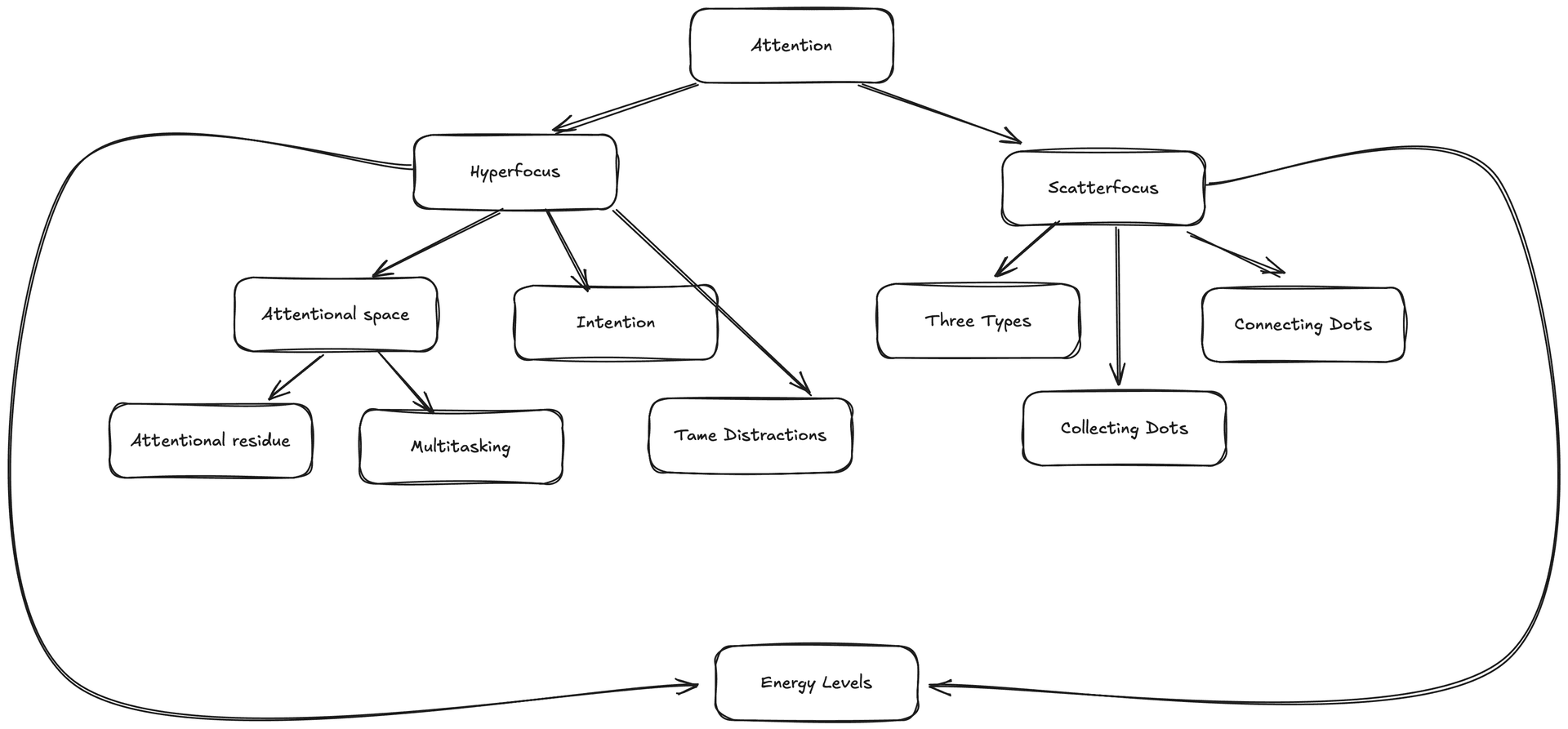
There are two attention modes: Hyperfocus and Scatterfocus.

Hyperfocus involves directing complete attention to a single task. It occurs when you fill your entire attentional space with one activity and resembles a flow state. The better your focus, the more productive you become.

Scatterfocus allows your mind to wander and make connections between different concepts.

They play together nicely & complement each other. Match your energy levels to select the appropriate mode. Choose hyperfocus during high-energy periods and target important, challenging tasks. During low-energy periods, choose scatterfocus through meditation, intentional mind wandering, or "sleeping on" problems. While hyperfocus theory and tactics are well-documented, scatterfocus represents a novel concept to me. The interplay between these distinct modes creates valuable synergies.

Core Concept Hierarchy

Hyperfocus Core Concepts Hierarchy

Discoveries

⚡ Focusing on the right task is crucial (you control what receives focus). You will:

  • accomplish what you intend to much more often

Really? New language every year?

Two questions come up, even when I’m writing that one.

  1. “Are there even that many languages to learn?”
  2. “Do you really learn one language every year?

Yes and no (or kind of…).

The Numbers Game

Yes, there are many languages. I couldn’t find specific number of programming languages. Many pages states there are more than 700 programming languages. TIOBE index lists 100 most popular. So yeah, if you want to learn new programming language every year, there are bunch to choose from. That’s more than enough to keep you busy for a lifetime.

No, I’m not learning new language every year. But it gives a good picture. It’s more complex. After 15+ years in trenches, here’s what my language portfolio looks like:

The Money-Makers (Languages I've Used Commercially)

  • Java
  • Obj-C
  • JavaScript
  • Scala
  • Swift
  • Kotlin
  • TypeScript
  • PHP
  • Go

The Side-Project Squad (Languages I've Tinkered With):

  • C
  • C++
  • Python
  • Haskell
  • Elm
  • Rust

While learning to write better, I've gone down countless rabbit holes. I always do. To dive deep into the topic, I buy books & courses, read articles. Let’s call it “thorough research” (which is also kind of procrastination to be honest).

I stumbled upon Essay Writing Guide by Jordan Peterson. It’s concise, short and well-written. I highly recommend it. There’s nothing groundbreaking, but it’s a solid piece of advice. The interesting thing is that it’s written in example-to-exercise style.

And I found interesting passage:

There is, by the way, no such thing as reader’s block. If you can’t write, it is because you have nothing to say. You have no ideas. In such a situation, don’t pride yourself on your writer’s block. Read something. - Jordan Peterson

Sounds interesting. I’ve never come across such an idea.

The Input/Output Ratio

You can look at that from 2 perspectives. You either have no topics to write about or you don’t know enough about a topic to write about it. In both cases, you can read & dig deeper. To write an essay, you need 2 or 3 times more notes, by words.

How can we work faster? That’s probably the question a lot of founders ask.

You can't improve what you don't measure. - Peter Drucker (and many more…)

There are many metrics but only few make sense. I've seen countless teams obsess over velocity metrics, story points, and sprint burndowns. Most can be gamified & improved without affecting final result. But here's the thing - there's one metric that often gets overlooked, yet tells us more about our development efficiency than all the others combined.

Enter Time To First Commit. As every good thing needs acronym, we’ll have one - TTFC.

I wish I use it more often. It’s also interesting from the employee perspective. It can tell a lot about company. But that's history for another post.

What exactly is TTFC?

I was starting my software developer journey. I knew how to write code. But I knew almost nothing about developing software. I was finishing my master’s degree in Computer Science and started my first job as Java developer. After 2 weeks of introductory period, I got my first project and task. I setup environment. I cloned project and started working. There was only 1 problem. My code didn’t run. I got compilation errors. I was new. I pushed hard. I didn’t want to ask for help on my first day. How is that I cannot simply run code? What am I missing? After a day of struggling, I finally asked for help…

It turn out it was common. Code wasn’t compiling. Devs pushed code to stable branch even though it was not compiling. 🤯 (For the record. In Java, you need to compile first and run second. If compilation fails, you’ll see nothing.)

There were projects where only single person was capable of running system…

My mind exploded.

That was about 15 years ago. A lot has changed. Or at least I hope so…

It’s done but not working

Cover Image for Approaching Life With Seasons Mindset

You’re waiting whole year till January. Finally you’ll be able to plan upcoming year, set goals and start from the beginning. Planning in January is exciting. The year is beginning and you have carte blanche. There are 365/366 days. That’s a lot. You plan several goals. Of course, everything won’t fit but many will…

But if there are so many interesting things, which one to choose? (Or how to do them all?)

You need to choose carefully. There’s January and you’re setting goals for the whole year. Of course, they cannot change. That’s the idea of yearly planning. You want to plan ahead whole year. Don’t worry if anything goes bad, you have another year…

That’s how I imagine setting goals. I used to do that. And most people do that. Gym is the best place to observe that. In January, gym is full. In Feb, gym is empty. In March, everyone is waiting till next January.

It’s February, gym is empty.

Cover Image for Effortlessly Navigate TypeScript Code in VSCode with This Handy Tip

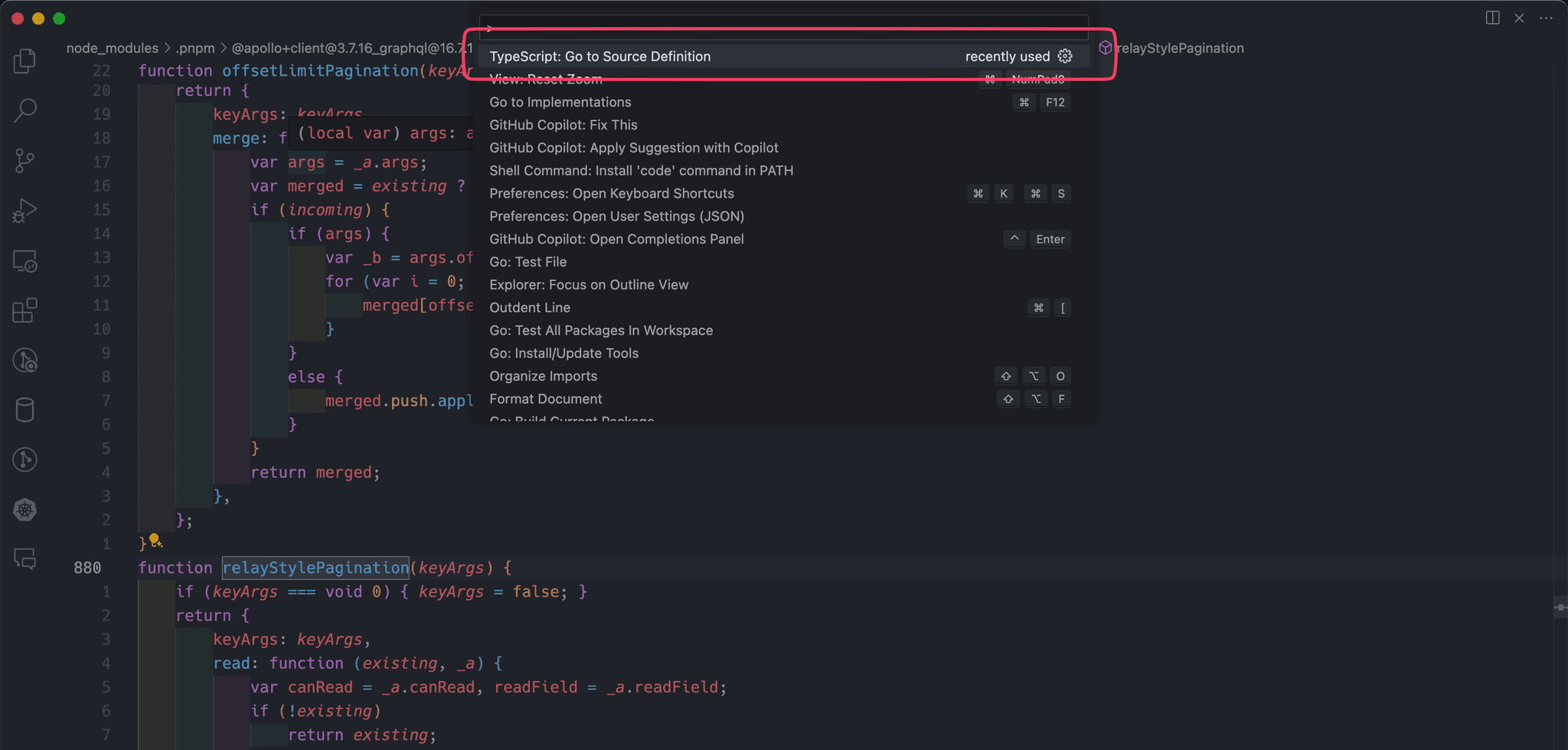
How often do you use Go to Definition in VSCode? I use it quite often, especially when working with new libraries. When working with TypeScript, you've probably noticed that Go to Definition goes to the TypeScript declaration file, usually index.d.ts. It's great. Most of the time, I want to check the type definition:

  • Drill into possible params
  • Check if generics are supported
  • Debug why I'm getting compiler errors

Still, once in a while, I want to dive into the code. Usually, I didn't even bother to check VSCode options. I simply dive into the GitHub repo. But it's slow. 🐢 Navigating between files is cumbersome. I cannot use my VIM super powers. Ehhhhh.

Last time I was digging into GraphQL pagination. We're using Apollo with relayStylePagination. Muscle memory took me to the file declaration. But the pure type definition was not helping:

export declare function relayStylePagination<TNode extends Reference = Reference>(keyArgs?: KeyArgs): RelayFieldPolicy<TNode>;

I had to dig into the source code. I didn't want to play with GitHub. Luckily, there's an option: TypeScript: Go to Source Definition. 🥳

Go to Source Definition

You don't know what you don't know.

Cover Image for Uncontrolled Chaos: Why React Devs Still Struggle with Form Components

I've read & reread React documentation multiple times. Quite a lot of things are explained really well. The truth is that when I was starting working with React in late 2014 there was almost no other source apart from documentation. And maybe that helped me to master React from the ground up? 🤔 Now we've got gazillion blogs about everything. But there's 1 tiny problem. Devs still don't get the basics. Devs still don't get what is a difference between controlled & uncontrolled components. Let's tackle that one (so that we have another blog post on React - number gazillion + 1). And later let's move to the reason why that's still the case.

Cover Image for Why ChatGPT (+ many tutorials) are wrong about React & debounce

I needed to implement debounce. I recalled seeing a solution somewhere in our codebase. I’ve used copy’n’paste strategy, adjusted code to work in my use case, run the app and … it wasn’t working 🤔

What’s going on?

That’s how my story with debounce started. I’ve already implemented debounce dozen of times. Now, instead of writing it myself, I’ve copied “working” solution from codebase. But it didn’t make sense. I didn’t even think that current solution wasn’t working, so I started debugging my part…

Quick recap -> What’s debounce?

Debounce is used in several use cases. The most common are:

  • search
  • autocomplete
  • loading options in dropdown The idea is simple. You don’t want to “spam” backend with multiple request when making search. Usually users type few characters or even whole words, then wait for results. You don’t want to make request for each keystroke. That’s when you need debounce. It’s deferred function call with twist. Debounce delays a function call until after a certain period of inactivity. Since image is 1000 words:
Cover Image for Full-Stack Challenge: Unpacking the Promises & Pitfalls

Jack of all trades, but master of none.

… who knows a lot of crafts lives in an empty house.

12 talents has nothing to eat for dinner.

The allure of the full-stack developer is undeniable: a versatile, agile problem-solver capable of understanding and working across the entire web development spectrum. However, this role comes with its own set of challenges and considerations.

Challenges from a Personal Perspective

Working across whole stack sounds interesting. Variety of tasks to complete sounds promising. The amount of knowledge to obtain sounds exciting. However, there are few challenges apart from keeping up with rapid technological changes.

The Breadth vs Depth

One of the primary challenges facing full-stack developers is the sheer breadth of knowledge. Full-stack is required to competently handle both front-end and back-end development. This vast landscape includes:

Cover Image for Domino Effect: The Coordination Nightmare - What Are Alternatives?

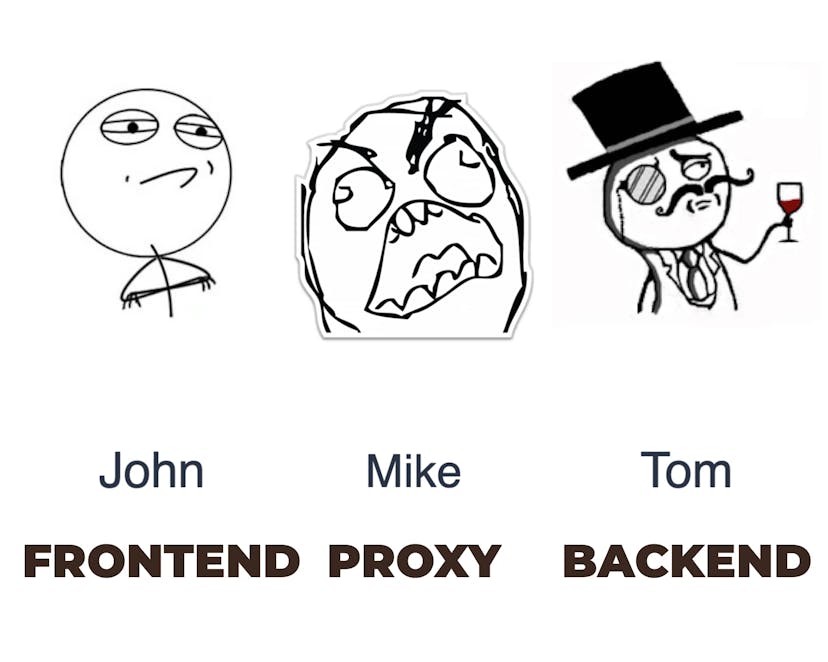
Imagine a scenario that's all too common in the world of web development—a project divided across three distinct layers: backend, proxy (gateway), and frontend. Each layer manned by a dedicated engineer. This setup, while seemingly organized, sets the stage for a coordination nightmare that can drastically slow down the development process.

The Domino Effect of Dependencies

Let me introduce 3 devs, who take care of system. Each has its own speciality.

Bartek Witczak

To implement a new feature, work must progress through each of these layers in sequence. The backend team kicks things off, followed by the proxy layer, and finally, the frontend team brings it all together. Sounds straightforward, right? Unfortunately, this is where the complexities of modern web development begin to rear their head.

  1. The backend dev completes their part and hands it off to the proxy team.
  2. Once the proxy layer is implemented, it's time for the frontend team to integrate the frontend aspects.
Cover Image for Adapting to the Web's Complexity: The Critical Role of Full-Stack Developers in Startup Environment

This guide embarks on a journey to explore the evolution of full-stack development. Full-stack developers are crucial, especially within the fast-paced, innovative environment of startups. But as the modern web becomes more complex, one could think that's impossible to keep up the tempo.

The Evolution of Full-Stack Development

The Early Days: Jack-of-All-Trades At first, web applications were relatively straightforward. Developers were expected to wear multiple hats, seamlessly transitioning between frontend and backend tasks. The focus was to deliver end-to-end functionality in web projects. The division of labor was not that visible. The term 'full-stack developer' was virtually synonymous with 'software developer.'

The Era of Specialization As the digital realm expanded, so did the complexity of web applications. The introduction of technologies like AJAX marked a significant turning point. Rich user experience was the tipping point of a deeper specialization. Animations, responsiveness, lazy loading became more important & common. This period saw the emergence of dedicated roles, dividing developers into more focused areas of expertise.

Cover Image for Blogging Language Dilemma: My Reasons for Writing in English

There's a key decision every blogger faces at the outset: Should I write in English, the lingua franca of the programming world, or stick to my native tongue? This choice, seemingly straightforward, is layered with complexity and personal significance. My journey through blogging—starting, stopping, then restarting, and restarting—led me to a crossroads more than once.

Why I Chose English

At its core, for me, writing is thinking. This fundamental belief has shaped my approach to blogging. It's more a reflective practice rather than just a means of communication. I chose to write in English for several key reasons:

Cover Image for Avoiding Updates Pitfalls: Lessons Learnt

In the PART 1, I’m discussing what are challenges in dependency management, why is it crucial to update & what are main update strategies. If you haven’t read it, take a look so you can get more context. Part 1 was more like a theory. Now I want to dive into practical side.

First I want to share my use cases to give you a glimpse of possible problems.

Updating nx

We used nx to manage project. nx is framework to manage monorepo. It assumes that all projects within monorepo use the same version of dependencies. Additionally, nx uses a lot of plugins for different JS frameworks. E.g there's @nx/next plugin that contains generators & executors for managing Next application. Personally, I really don't like that approach. (I used both pure yarn + lerna & turbo approaches. Both were much better & easier to manage.).

Still, we wanted to leverage new features of Next.js, so we had to update to the latest version of nx. nx is growing fast. It's constantly changing. As a matter of fact, we had to update several versions. To make things harder, it was first big update. There was no knowledge, nor process defined.

Cover Image for Navigating the Complex World of Core Dependency Updates

Managing core dependencies is a task that often walks a fine line between necessity and challenge. It's crucial to understand the dynamics of dependency updates. And it's crucial both for developers & managers. I'll dive into the world of dependency management, unearthing strategies and insights. I'll describe various possibilities, but you need to choose your own way. As always, context is the king - consider requirements, resources, and risk tolerance.

Personal Insight: I recall the struggle we faced while updating monorepo framework. I remember that one being especially painful. We had a need to update nx dependency to kickstart a new project within monorepo. In ever-changing JS world, we have been few versions behind in the matter of months.

Understanding Semantic Versioning

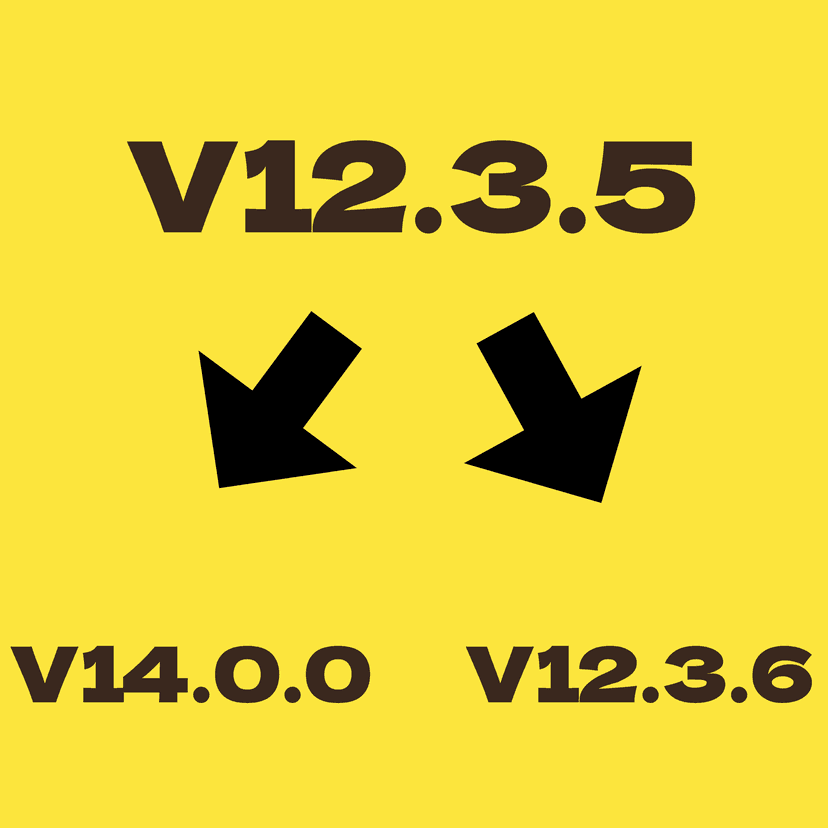
Semantic versioning is more than just a set of numbers assigned to your dependencies. It's a roadmap to understanding the impact of each update. Given as MAJOR.MINOR.PATCH, these versions convey critical information:

  1. MAJOR version changes signify incompatible API changes.
  2. MINOR version updates add functionality in a backward-compatible manner.
  3. PATCH version is for backward-compatible bug fixes.

Example: Version 15.8.2 breaks down as:

  • Major: 15
  • Minor: 8
  • Patch: 2
Cover Image for Overcome the Monday Morning Hurdle: My Journey with Hemingway's Bridge in Coding

Where should I go next?

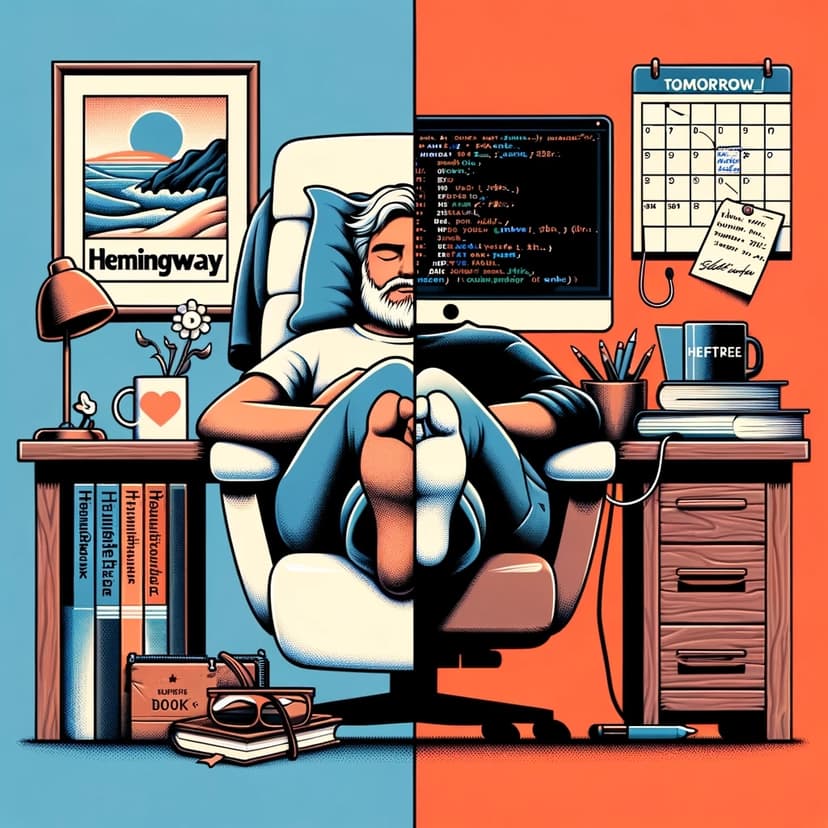
It's Monday morning. You're back at your desk after a weekend break, ready to dive into coding. But there's a problem: where do you start? You find yourself spending precious time trying to recall where you left off on Friday. This isn't just frustrating; it's a momentum killer. And it doesn’t have to happen only on Monday. This scenario mirrors the dreaded writer's block, where the hardest part is often just beginning. The solution is something called Hemingway's Bridge. Hemingway would stop writing “in the middle” of a sentence. This made it easier for him to start again the next day. I stumbled upon that idea in the book "Building a Second Brain" by Tiago Forte. It helps me start my day more effectively.

Adapting Hemingway's Bridge for Software Development

Cover Image for Beyond the Code: Balancing Work, Growth, and Passion in Programming

Programming is far more than just writing code; it's fundamentally about solving complex problems and continually adapting to new challenges. In the pursuit of a sustainable and fulfilling career, finding the right balance is crucial – it's a long game where the goal is to remain productive and passionate not just for the current job, but for years to come. Kent Beck wrote about 80/15/5 rule. That's what made me thing about my journey. Two of my top 5 talents from Gallup Strength Finder are Input & Learner. In this blog, I’ll share my experiences with this rule, exploring how it has helped me maintain this crucial balance and thrive in the ever-evolving world of programming.

The 80% - Daily Work

In any programmer's career, the bulk of time – 80% – is inevitably spent on what I like to call the bread and butter of our profession. This includes implementing features, debugging, attending meetings, and preparing reports. It's the core of our day-to-day responsibilities that keeps the wheels turning in any tech organization.

Cover Image for Steal Like an Artist (polish)

Nie pamiętam, dlaczego postanowiłem przeczytać tę książkę kolejny raz. Chyba podczas jednej z rozmów z moim przyjacielem, kolejny raz padło stwierdzenie “Great artists steal”. Przypomniała mi się od razu książka Austina i postanowiłem do niej wrócić.

Książka składa się z 10 myśli przewodnich na temat kreatywności, o których nikt Ci nie powiedział.

1. Kradnij jak artysta.

Good artists borrow; Great artists steal - Steve Jobs

Everything that needs to be said has already been said. But, since no one was listening, everything must be said again. - Andre Gide

Nic nie jest oryginalne. Wszystko jest sumą poprzednich dzieł, doświadczeń, obserwacji. Założenie, że trzeba wymyślać koło od nowa jest idiotyczne. Każdy nowy pomysł jest mieszaniną kilku innych.

Kilka pierwszych rozdziałów bardzo mocno rezonuje z przekonaniami Tiago Forte na temat budowania własnego systemu notatek. Tzw. “Second Brain” to miejsce, gdzie warto gromadzić wszystkie notatki, artykuły, przemyślenia czy inne dzieła. Kolejnym krokiem jest tworzenia własnych materiałów. Im więcej pomysłów zgromadzisz, tym więcej będziesz miał materiału do tworzenia.

Przygotuj sobie miejsce na notatki. Prawdopodobnie po wypróbowaniu 10 programów dojdziesz do wniosku, że to nie ma żadnego znaczenia. Dlatego po prostu zacznij gromadzić materiały, które Cię zainteresują.

Cover Image for Organize Tomorrow Today (polish)

Knowing something doesn’t change your life. Doing something does.

Nie pamiętam jak trafiłem na tę książkę. Prawdopodobnie ktoś polecił ją w podcaście. Dodałem jako pozycję 2.500.382 do mojej listy książek do przeczytania. Kolejna książka na temat organizacji czasu / dnia / celów. Wypas. W poszukiwaniu świętego Graala, który nie istnieje, przeczytałem już chyba 10 pozycji. W większości pozycji powtarzane są w kółko te same pomysły z lekką zmianą. W Organize Tomorrow Today zainteresował mnie kontekst => sport => MLB, NBA, NFL. No to macie moją uwagę. Współpraca ze sportowcami musi być na najwyższym poziomie, bo tam często liczą się szczegóły.

They established an “obsession for improvement” as a key part of their ( St. Louis Cardinals ) culture. No matter how successful they got, they were always on the lookout for new information that could help them improve.

Książka została podzielona na 8 technik / mechanizmów / konceptów:

Cover Image for Do The Work - Steven Pressfield (polish)

Podchodziłem do tej pozycji drugi raz. Pierwszym razem kupiłem ją zaraz po przeczytaniu The War od Art. Wtedy wydała mi się po prostu słaba. Dziwny format. Mało treści. Krótka ( jakby o jakości książki świadczyła liczba stron - ale to przemyślenie na inny temat ). Przewertowałem, pokręciłem nosem i odłożyłem.

2 lata później temat OPORU wrócił. Działanie nad CrossKeeper’em idzie pełną parą, ale przejście do tematów marketingu, sprzedaży i obsługi klienta nie jest proste. Bezpiecznie jest wrócić do kodowania. Niestety bez marketingu i sprzedaży pewnie za daleko nie zajdziemy, także trzeba działać. Tutaj wraca temat Pressfield’a.

DO THE WORK - Steven Pressfield ( polska wersja Do roboty! )

Cała książka skupia się na temacie OPORU. Tak naprawdę wszystko to co nas blokuje może być nazwane OPOREM, OPOREM przed działanie. Pressfield definiuje 3 rzeczy, które zatrzymują nas przed działaniem:

  1. OPÓR
  2. Racjonalne myślenie
  3. Rodzina i przyjaciele